
Robohub.org
ROS101: Creating a subscriber using GitHub
 By Martin Cote
We previously learned how to write a publisher node to move Husky randomly. BUT: what good is publishing all these messages if no one is there to read it? In this tutorial we’ll write a subscriber that reads Husky’s position from the odom topic, and graph its movements. Instead of just copy-pasting code into a text file, we’ll pull the required packages from GitHub, a very common practice among developers.
Before we begin, install Git to pull packages from GitHub, and pygame, to provide us with the tools to map out Husky’s movements:
sudo apt-get install git
sudo apt-get install python-pygame
Pulling from GitHub
GitHub is a popular tool among developers due to its use of version control – most ROS software has an associated GitHub repository. Users are able to “pull” files from the GitHub servers, make changes, then “push” these changes back to the server. In this tutorial we will be using GitHub to pull the ROS packages that we’ll be using. The first step is to make a new directory to pull the packages:
mkdir ~/catkin_ws/src/ros101
cd ~/catkin_ws/src/ros101
git init
Since we now know the URL that hosts the repositories, we’ll easily be able to pull the packages from GitHub. Access the repositories using the following command:
git pull https://github.com/mcoteCPR/ROS101.git
That’s it! You should see an src and launch folder, as well as a CMakelist.txt and package.xml in your ros101 folder. You now have the package “ros101″, which includes the nodes “random_driver.cpp” and “odom_graph.py”.
Writing the subscriber
We’ve already gone through the random_driver C++ code in the last tutorial, so this time we’ll go over the python code for odom_graph.py. This node uses the Pygame library to track Husky’s movement. Pygame is a set of modules intended to create video games in python; however, we’ll focus on the ROS portion of this code. More information on Pygame can be found on their website. The code for the odom_graph node can be found at:
gedit -p ~/catkin_ws/src/ros101/src/odom_graph.py
Let’s take a look at this code line by line:
import rospy
from nav_msgs.msg import Odometry
Much like the C++ publisher code, this includes the rospy library and imports the Odometry message type from nav_msgs.msg. To learn more about a specific message type, you can visit http://docs.ros.org to see it’s definition, for example, we are using http://docs.ros.org/api/nav_msgs/html/msg/Odometry.html . The next block of code imports the pygame libraries and sets up the initial conditions for our display.
def odomCB(msg)
This is the odometry call back function, which is called every time our subscriber receives a message. The content of this function simply draws a line on our display between the last coordinates read from the odometry position message. This function will continually be called in our main loop.
def listener():
The following line starts the ROS node, anonymous=True means multiples of the same node can run at the same time:
rospy.init_node('odom_graph', anonymous=True)
Subscriber sets up the node to read messages from the “odom” topic, which are of the type Odometry, and calls the odomCB functions when it receives a message:
rospy.Subscriber("odom", Odometry, odomCB)
The last line of this function keeps the node active until it’s shut down:
rospy.spin()
Putting it all together
Now it’s time to test it out! Go ahead and close the odom_graph.py file and build your workspace using the catkin_make function in your workspace directory.
cd ~/catkin_ws
catkin_make
The next step is to launch our Husky simulation to start up ROS and all the Husky related nodes
roslaunch husky_gazebo husky_emepty_world.launch
In this tutorial we have provided a launch file that will start the random_driver and odom_graph node. The launch file is located in ~/ros101/src/launch and is called odom_graph_test.launch. If you want to learn more about launch files, check out our launch file article on our support knowledge base. We will now source our workspace and launch both nodes with the launch file in a new terminal window.
source ~/catkin_ws/devel/setup.bash
roslaunch ros101 odom_graph_test.launch
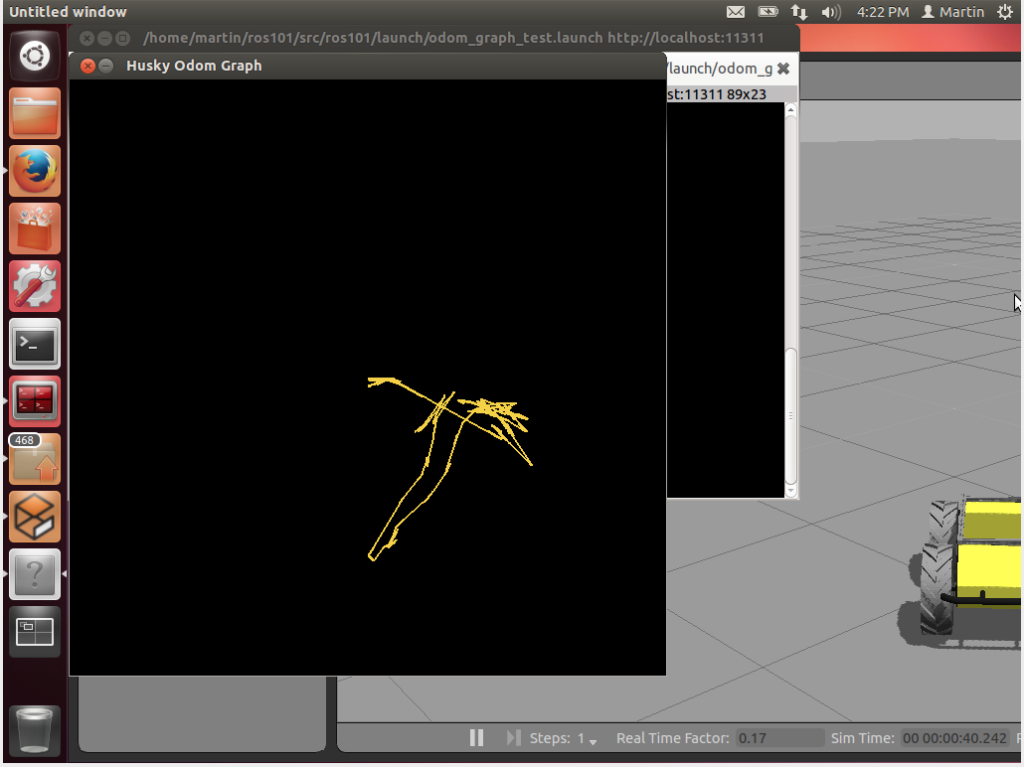
There you have it! Our subscriber is now listening to messages on the odom topic, and graphing out Husky’s path.
See all the ROS101 tutorials here.
tags: c-Education-DIY, ROS, ROS101 Tutorial, tutorial