
Robohub.org
ROS 101: Intro to the Robot Operating System
Clearpath Robotics brings us a new tutorial series on ROS!
Since we practically live in the Robot Operating System (ROS), we thought it was time to share some tips on how to get started with ROS. We’ll answer questions like where do I begin? How do I get started? What terminology should I brush up on? Keep an eye out for this ongoing ROS 101 blog series that will provide you with a top to bottom view of ROS that will focus on introducing basic concepts simply, cleanly and at a reasonable pace. This guide is meant as a groundwork for new users, which can then be used to jump into in-depth data at wiki.ros.org. If you are totally unfamiliar with ROS, Linux, or both, this is the place for you!
The ROS Cheat Sheet
This ROS Cheat Sheet is filled with tips and tricks to help you get started and to continue using once you’re a true ROS user. This version is written for ROS Hydro Medusa. Download the ROS Cheat Sheet here.
What is ROS?
ROS (Robot Operating System) is a BSD-licensed system for controlling robotic components from a PC. A ROS system is comprised of a number of independent nodes, each of which communicates with the other nodes using a publish/subscribe messaging model. For example, a particular sensor’s driver might be implemented as a node, which publishes sensor data in a stream of messages. These messages could be consumed by any number of other nodes, including filters, loggers, and also higher-level systems such as guidance, pathfinding, etc.
Why ROS?
Note that nodes in ROS do not have to be on the same system (multiple computers) or even of the same architecture! You could have a Arduino publishing messages, a laptop subscribing to them, and an Android phone driving motors. This makes ROS really flexible and adaptable to the needs of the user. ROS is also open source, maintained by many people.
General Concepts
Let’s look at the ROS system from a very high level view. No need to worry how any of the following works, we will cover that later.
ROS starts with the ROS Master. The Master allows all other ROS pieces of software (Nodes) to find and talk to each other. That way, we do not have to ever specifically state “Send this sensor data to that computer at 127.0.0.1. We can simply tell Node 1 to send messages to Node 2.
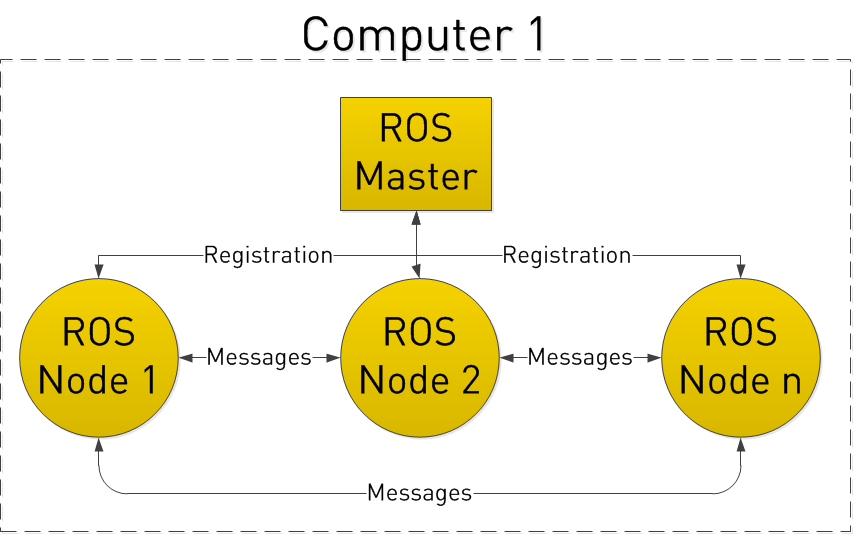
How do Nodes do this? By publishing and subscribing to Topics.
Let’s say we have a camera on our Robot. We want to be able to see the images from the camera, both on the Robot itself, and on another laptop.
In our example, we have a Camera Node that takes care of communication with the camera, a Image Processing Node on the robot that process image data, and a Image Display Node that displays images on a screen. To start with, all Nodes have registered with the Master. Think of the Master as a lookup table where all the nodes go to find where exactly to send messages.
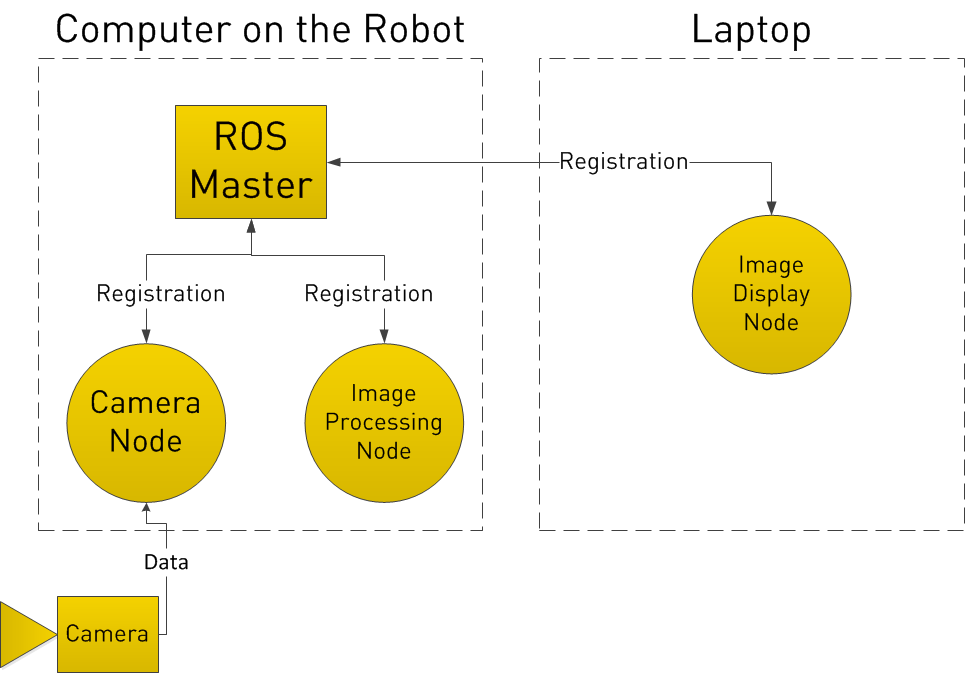
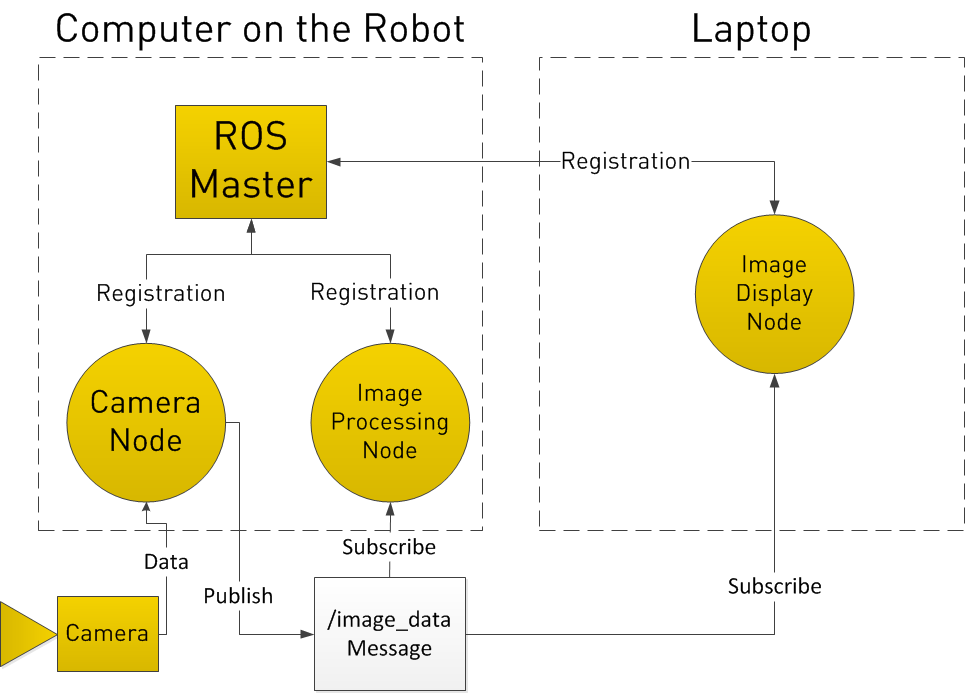
In registering with the ROS Master, the Camera Node states that it will Publish a Topic called /image_data (for example). Both of the other Nodes register that they are Subscribed to the Topic /image_data.
Thus, once the Camera Node receives some data from the Camera, it sends the /image_data message directly to the other two nodes. (Through what is essentially TCP/IP)
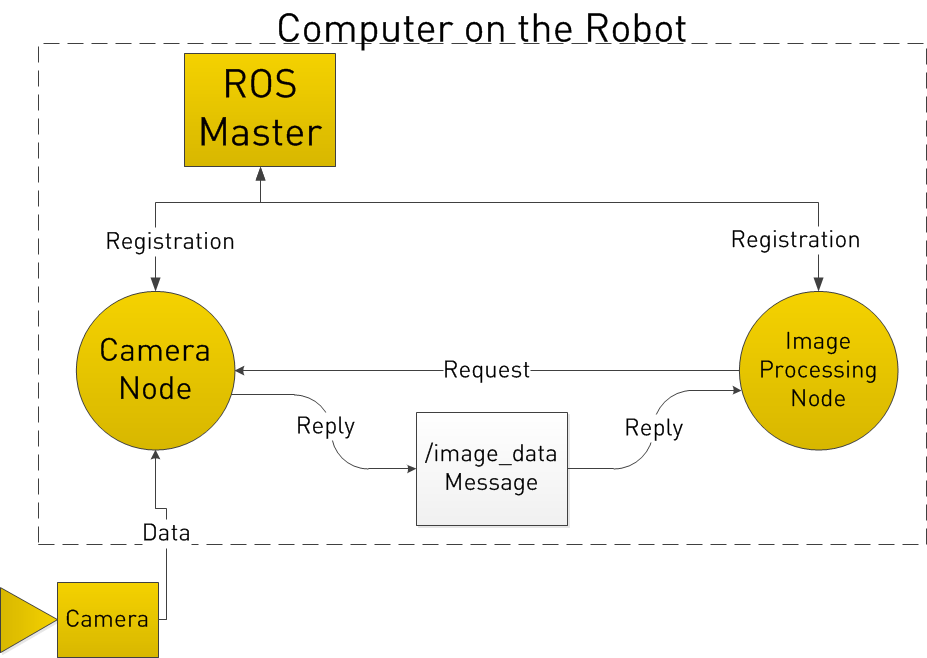
Now you may be thinking, what if I want the Image Processing Node to request data from the Camera Node at a specific time? To do this, ROS implements Services.
A Node can register a specific service with the ROS Master, just as it registers its messages. In the below example, the Image Processing Node first requests /image_data, the Camera Node gathers data from the Camera, and then sends the reply.
We will have another tutorial “ROS 101 – Practical Example” next week.
See all the ROS101 tutorials here. If you liked this article, you may also be interested in:
- Up and flying with the AR.Drone and ROS: Getting started
- Taking your first steps in robotics with the Thymio II
- Discovering social robotics with the Aisoy1
- Parrot AR.Drone app harnesses crowd power to fast-track vision learning in robotic spacecraft
See all the latest robotics news on Robohub, or sign up for our weekly newsletter.
tags: ROS, ROS101 Tutorial, tutorial

AUAI is supported by: