Robohub.org
Programming your NAO robot for human interaction
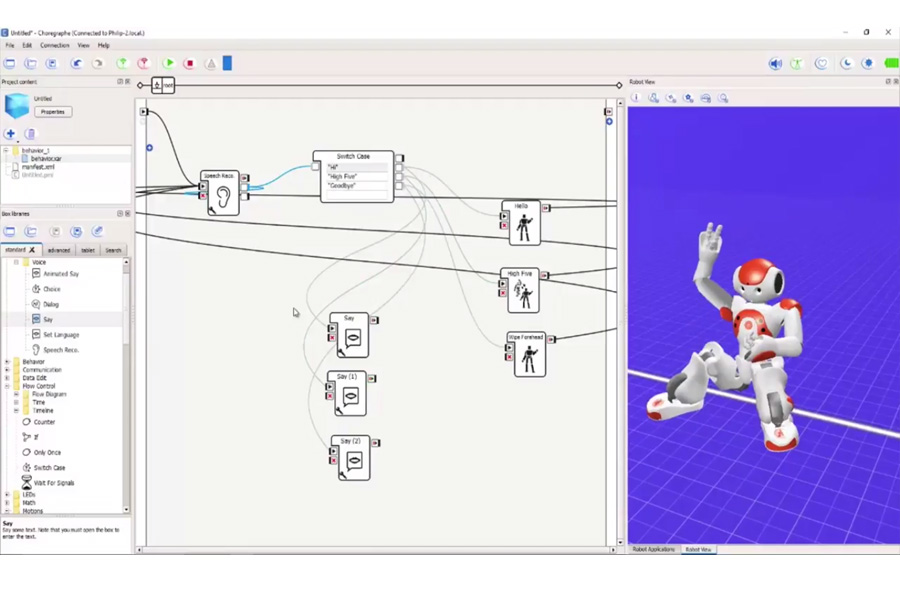
Today we are looking at how to program your NAO Robot for Human Interaction. Watch the video and follow the steps below to get interactive with your robot pal!
- Create an animation of movements
- Right click, select “Create a new box”
- Select “Timeline”
We want the robot to do 3 things, a five high, a hello, and a goodbye move:
- On the Timeline Edit Box
- Name: High Five
- Image: Click “Edit”
- On the Edit box image
- Click “Browse” and select a file
- Click “OK”
Now, as you can remember, if we take it to the box, we can get access to the NAO’s Timeline. Mine now is connected to the PC. So what I’m going to do is I’m going to set some points of the NAO to do some movements. As I have said before on one of my tutorial I’m going to make it set all the joints to the whole body.
We want to make him look like he is doing a high five:
- Right click the arm
- Click “Stiffen chain on/off”
- Raise his arm up
- Set joints and keyframe
- Select “Arms”
- Click “Play” on the Motion Controller
That’s a quite quick high five actually. What we want to do is to actually give him a pause when he got his arm in the air. So, the way we do that is to copy and paste the keyframe.
Grab a few already built in animation, just to show you how much it works:
- Go to Motions>Animations
- Drag a “Hello” box to the workspace
- Drag a “Wipe Forehead” box for a goodbye move to the workspace
We want to hear him speak, so:
- Go to Voice
- Drag a “Speech Recognition” box to the workspace
- Drag a “Switch Case”
- Connect the “Speech Recognition” box to the “Switch Case” box
- On the first case, write “Hello” and connect to the “Hello” box
- On the second case, write “High Five” and connect it to the “High Five” box
- On the third case, write “Goodbye” and connect it to the “Wipe Forehand” box
- Set parameters of Speech Recognition
- Word list: Hi; High Five; Goodbye;
- Play with the threshold to see what works better
- Click “OK”
So there we have a speech recognition, he will listen to what I am saying and then we will act a motion. Now, what we need to do is to make sure that the robot doesn’t repeat it, so you know, it doesn’t loop back. Before we do that, we are going to:
- Drag 3 “Say” box to the workspace so he can speak back to us
- On the “Switch case”, connect the “Hello” case on the “Say” box
- Localized Text
- Change the language to English(United States)
- Write “Hi” on the textbox
- Localized Text
- Connect the “High Five” case on the “Say (1)” box
- Localized Text
- Change the language to English(United States)
- Write “High Five” on the textbox
- Localized Text
- Connect the “Goodbye” case on the “Say(2)” box
- Localized Text
- Change the language to English(United States)
- Write “Goodbye” on the textbox
- Localized Text
- On the “Switch case”, connect the “Hello” case on the “Say” box
So, here’s what we are saying, he recognizes it, says a word and does an animation, now what we want to do is we don’t want him to loop, as in he keeps hearing the same sound and maybe he starts to hear himself and repeat himself, so to stop that we need to connect the end of the motion boxes back to the “Speech Recognition” box. A simple output to the input speech.
I am going to make a little change actually, instead of “Hello”, we should put “Hi” here and I’m going to put “Hi” in there which is already done because they have to match otherwise if it doesn’t match he won’t recognize it. So if he hit “Load”
Philip: High Five!
Nao: High Five!
Philip: Goodbye!
Nao: Goodbye!
Philip: Hi!
Nao: Hello!
Brilliant! So that looks likes he’s working very well, so again if we says “Hi”, “High Five” or “Good bye” then he will greet you. If you walk in to room and you say “Hi” to a robot, obviously, he will do his animation and say a speech. Here you can use your imagination and try different things, different animations.
If you liked this article, you may also enjoy these from Robo-Phil:
See all the latest robotics news on Robohub, or sign up for our weekly newsletter.
tags: Algorithm Controls, c-Education-DIY, coding, cx-Consumer-Household, human-robot interaction, humanoid, NAO, programming, robot, software, video

AUAI is supported by: